Now that information is being sent into Max, via the TuioClient, this information needs to be routed and separated into individual data points. This way the information is more useful than the list the TuioClient sends into Max.
The first thing is to understand and route the fiducial marker data. The data I have used is listed in the following way;
1 = update and remove object (when camera recognises an object and when it is removed).
2 = Marker Counter (counting when an object is recognised and removed).
3 = Fiducial Marker Number.
4 = X data (Left and Right Position).
5 = Y data (Up and Down Position).
6 = Rotation Data.
By using the route object messages can be organised by the objects arguments (Cycling74, 2019). The first route object allows me to organise data based on when the markers are recognised by the camera. From this point list information is the processed using the zl object. Using the slice and integer arguments the list is processed accordingly (Cycling74, 2019) (see Fig.3.1.).
In my patch the first route and zl slice objects are being used to process the list information to show me what objects are being recognised and removed, as well as, then slice the list information from the first data point. Doing this allows me to remove the update/remove object count number, which I have no use for, leaving me with information starting from the fiducial marker number.

Now that the list data from the TuioClient has been processed I am now able to use the markers X, Y and rotation data to control various objects within max. I have built the various controls within different sub-patches. By using the encapsulate command a sub-patch will be created grouping objects together and saving space within the main patcher window (Cycling74, 2019) (see Fig.3.2.).
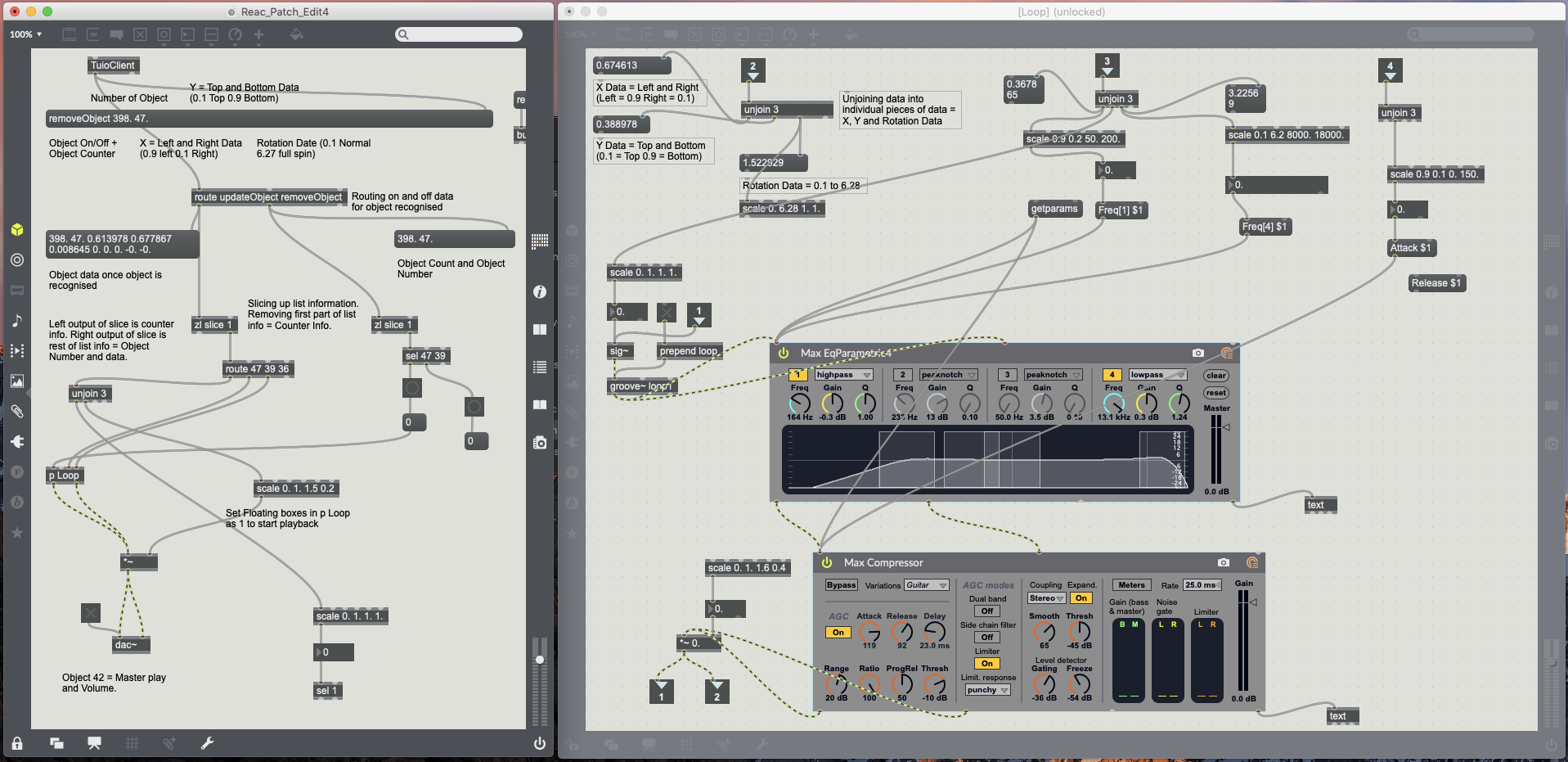
Although I have the data I now want to use to control objects within Max, it still needs to be processed into individual data points and converted to the correct integer or floating point values. Using the Unjoin object breaks lists into individual messages/values (Cylcing74, 2019). This allows for the individual markers X, Y and rotation data to now be processed separately from each other. This information is received in Max as floating point data in the follow way;
X = 0.01 (Right) to 0.99 (Left)
Y = 0.01 (Top) to 0.99 (Bottom)
Rotation = 0.01 to 6.27
Not all plugins and objects within Max will work to these data values/ranges. Using the Scale object allows any input value, integer or floating point, to be converted to larger or smaller values, integer or floating point (Cycling74, 2019) (see Fig.3.3.).

References.
Cycling74, 2019. Encapsulate and De-encapsulate Reference. [Online] Available at: https://docs.cycling74.com/max7/vignettes/encapsulate_deencapsulate [18/04/2019].
Cycling74, 2019. Route Max Reference. [Online] Available at: https://docs.cycling74.com/max5/refpages/max-ref/route.html [16/04/2019].
Cycling74, 2019. Scale Reference. [Online] Available at: https://docs.cycling74.com/max7/maxobject/scale [18/04/2019].
Cycling74, 2019. Unjoin Reference. [Online] Available at: https://docs.cycling74.com/max7/maxobject/unjoin [18/04/2019].
Cycling74, 2019. zlSlice Max Reference. [Online] Available at: https://docs.cycling74.com/max7/maxobject/zl.slice [16/04/2019].

 Interactive Sound Environments - MUS633